
- Betbhai9
- Betbhai9 Withdrawal
Betbhai9 Withdrawal — Balance Deducted at Once, Fast UPI Credit in 30 to 60 Minutes, Withdraw by Text
Three numbers decide a Betbhai9 withdrawal: 30 to 60 minutes for the credit, 3 requests per day, and the name on the receiving account, which has to match yours. There is no payout option inside the lobby, so the request is a text to the desk chat that set up your ID. The top-bar Balance shrinks the moment it is booked.

Fast Betbhai9 Withdrawal Clock: From Chat Request to UPI Credit
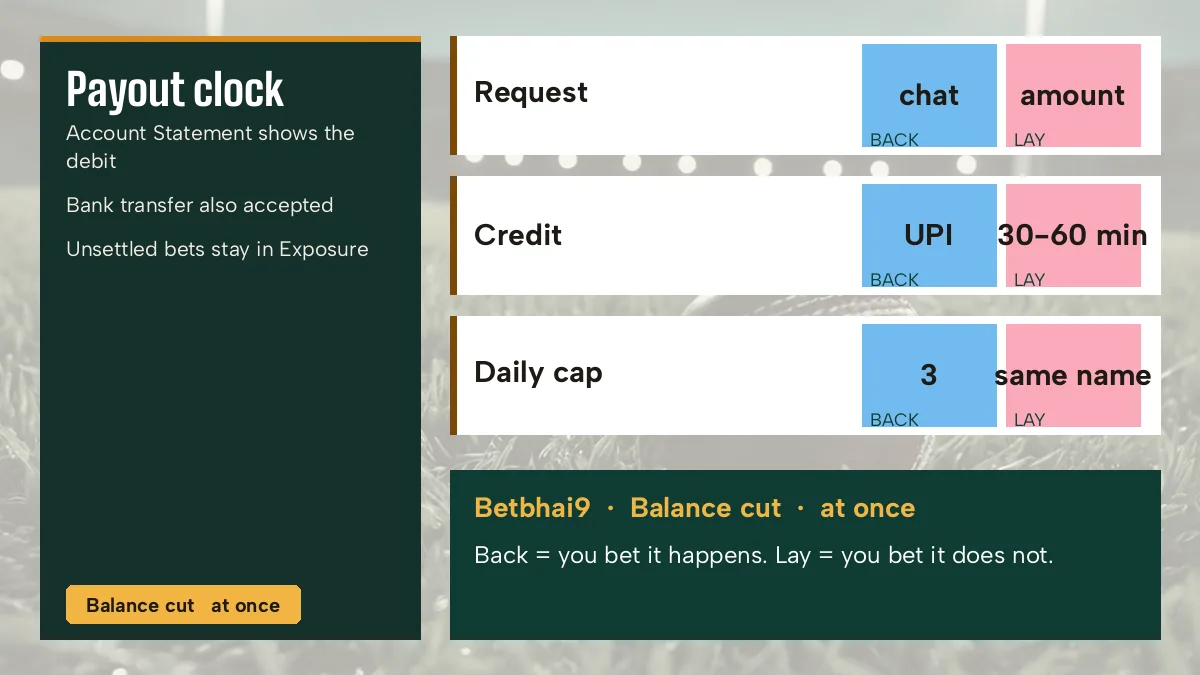
Only one step is yours. You send the request, and everything after it runs on the desk's clock, which is why a Betbhai9 withdrawal feels instant on the Balance and slower on the bank app.
- Request
- Your text, sent on the WhatsApp thread your Betbhai9 ID came from. Staffed 24x7.
- Balance cut
- At once. The figure on the Betbhai9 top bar falls as soon as the payout is booked.
- Credit
- 30 to 60 minutes, by UPI or bank transfer.
- Account
- Same name as the Betbhai9 ID holder; a relative's UPI handle does not fit that rule.
- Daily cap
- 3 withdrawals per day.
Order matters here. Your Betbhai9 Balance drops first and the credit follows, so for anything up to an hour you will see a smaller number in the lobby and nothing new on PhonePe or in the bank app, and that gap is simply the 30 to 60 minute window doing what it says rather than a sign that the payout went missing. A deposit cap set before the first top-up makes this clock easier to live with; the Betbhai9 responsible gaming page lists the cap and pause options.
A quick worked example. Ask at 11:20 pm, and the Balance falls right then; the credit should land somewhere between 11:50 pm and 12:20 am. A second request later that night is fine, and so is a third. A fourth on the same day is not.
Use the same chat, name an account that is in your own name, and keep count of your requests (three is the ceiling for the day).
Do not resend the same Betbhai9 withdrawal after ten minutes because nothing has shown yet. The window is 30 to 60 minutes; a repeat message only clutters the thread.
Betbhai9 Withdrawal Is Not in the Account Menu — the Real Six Items
Tap your username on the Betbhai9 top bar and a dropdown opens with exactly six entries, in this order:
No Deposit. No Withdraw. No Profit & Loss either.
That missing entry confuses more people than anything else about a Betbhai9 withdrawal: they sign in, hunt through the dropdown for a button that was never built, and decide the Betbhai9 ID is broken, when in practice every rupee in or out moves through the WhatsApp desk and not the lobby. Even the demo login shows no wallet form. Account Statement is probably where you would confirm a payout later. Well, the top-bar Balance tells you sooner; the statement is for the record.
New here? Do the Betbhai9 register steps first, since there is nothing to withdraw without a funded ID. Lost the chat thread that issued it? The Betbhai9 contact number page lists how to reach the same desk again, and that desk is the one that handles every Betbhai9 payout.
Quick Betbhai9 Withdrawal Answers for First-Time Payouts
How do I make a quick Betbhai9 withdrawal?
There is no Withdraw entry under your username, so the request is a text. Send the figure to the desk chat that set up your Betbhai9 ID; it comes off the top-bar Balance straight away and goes to a UPI handle or bank account held in your name. Three such requests is the most per day.
How long does a fast Betbhai9 withdrawal take?
Between 30 and 60 minutes for the UPI or bank credit, counted from your text to the desk. Your Betbhai9 Balance falls before that, so a smaller figure on the top bar with an empty bank app is expected within that hour. Past the hour, reply in the same chat with the amount and the time you sent it.
- betbhai9 withdrawal
- betbhai9 withdrawal time
- betbhai9 withdraw kaise kare
- betbhai9 se paise kaise nikale
- betbhai9 upi withdrawal
- betbhai9 bank withdrawal
- betbhai9 withdrawal limit
- betbhai9 payout
- betbhai99 withdrawal